PWA + Pyodide: Two Tools for Building Apps That Need No Server At All
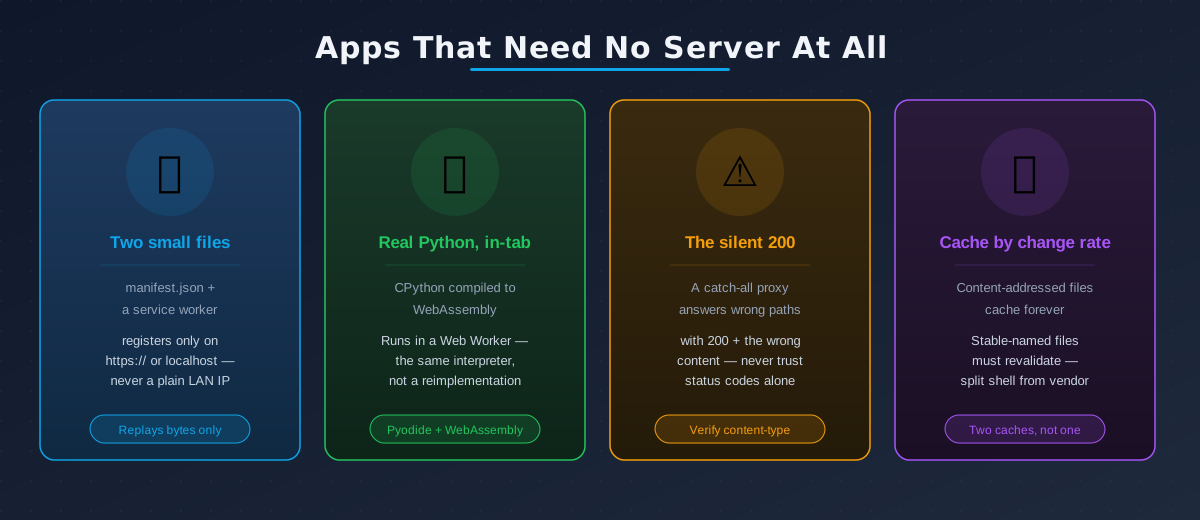
Why these two belong in one post
I’ve shipped a Progressive Web App layer, or Pyodide, or both, in three separate projects now — a statistics engine, a trackday video tool, and an X-ray QA toolkit. Each time I told myself it was a small addition. Each time it turned into a small course in exactly how browsers decide what to trust, and exactly how much a “success” response can lie to you.
Those posts are about the apps. This one is about the two technologies themselves — stripped of any single project, so the concepts transfer the next time you hear “make it work offline” or “make it run in the browser” and reach for the wrong mental model.
Part 1 — A PWA is two small files and one rule about trust
Strip away the marketing and a Progressive Web App is three ingredients:
- A
manifest.json— name, icons, start URL, the metadata that makes “Add to Home Screen” possible. - A service worker — a JavaScript file the browser runs on a background thread, separate from your page, that can intercept every network request the page makes.
- One hard rule: service workers only register on
https://, or on exactlylocalhost/127.0.0.1. Never on a plain LAN IP like192.168.1.50, even for testing on your own phone on your own network.
That third point trips people up constantly, and it’s not a bug to route around — it’s the platform refusing to run background, request-intercepting code anywhere it can’t cryptographically prove who served it. If you’re testing on a real device over Wi-Fi, you need either an HTTPS tunnel to your dev server or a deployed URL. A bare IP address will silently just never register the worker, with no error in the console telling you why.
A minimal manifest looks like this:
{
  "name": "My Offline App",
  "short_name": "MyApp",
  "start_url": "/",
  "display": "standalone",
  "background_color": "#0f172a",
  "theme_color": "#0ea5e9",
  "icons": [
    { "src": "/icons/192.png", "sizes": "192x192", "type": "image/png" },
    { "src": "/icons/512.png", "sizes": "512x512", "type": "image/png" }
  ]
}
And registering the worker is a handful of lines:
// register-sw.js
if ('serviceWorker' in navigator) {
  window.addEventListener('load', () => {
    navigator.serviceWorker.register('/sw.js');
  });
}
Here’s the part that’s easy to miss: a service worker cannot execute your app’s logic. It can only cache and replay bytes — HTML, JS, CSS, images, JSON. It’s a very capable proxy sitting between your page and the network, nothing more. That single limitation is why “make it work offline” and “make Python run in the browser” turn out to be the same underlying problem the moment your app needs to compute something, not just display cached pages.
Part 2 — Offline compute means shipping the interpreter
If a service worker can only replay static files, then an app that needs to run code offline — not just display a cached page — needs something that can actually execute that code with no server behind it.
For Python specifically, that something is Pyodide: the real CPython interpreter, compiled to WebAssembly, running inside a Web Worker in the browser tab. Not a JavaScript reimplementation of Python semantics — the actual interpreter, plus scientific packages like numpy, pandas, and scipy built as WASM-compatible wheels.
Loading it looks almost boringly simple:
// pyodide.worker.ts — runs in a Web Worker, not the main thread
importScripts('https://cdn.jsdelivr.net/pyodide/v0.29.3/full/pyodide.js');

async function boot() {
  const pyodide = await loadPyodide({ indexURL: '/vendor/pyodide/' });
  await pyodide.loadPackage(['numpy', 'micropip']);

  const micropip = pyodide.pyimport('micropip');
  await micropip.install('my_package-1.0.0-py3-none-any.whl', { deps: false });

  const result = await pyodide.runPythonAsync(`
    import numpy as np
    np.mean([1, 2, 3, 4, 5])
  `);
  postMessage({ result });
}
boot();
Three details in that snippet are the ones people learn the hard way:
- It has to run in a Web Worker, not the main thread. Pyodide boots slowly and any Python call blocks synchronously while it runs. Do this on the main thread and your entire UI — including the progress bar telling the user to wait — freezes along with it.
deps: falseis not optional decoration. If you’ve already loaded numpy as a native Pyodide package (a compiled WASM build), lettingmicropipresolve your wheel’s declared dependencies itself can install a second, incompatible pure-Python copy of numpy on top of the first.deps: falsesays “trust that the environment already satisfies this,” which is exactly the class of bug that only shows up as a mysteriousImportErroror a silently wrong computation, never a clean failure.- Data crossing the worker boundary should go as plain strings (usually JSON), not live object references. Pyodide can hand back
PyProxyobjects that reference WASM memory directly, but passing those around casually is how you leak memory the JS garbage collector doesn’t know how to reclaim, and how you couple your JS code to Python-specific object shapes it has no business knowing about.
For a Python web framework specifically — Streamlit, in my case — stlite is the layer above Pyodide that runs the framework itself on top of the WASM interpreter instead of a server process. The discipline that keeps this honest: don’t reimplement your app for the browser. Load the exact same application file both ways — streamlit run app.py on the server, runpy.run_path("app.py") inside the Pyodide worker — so “it works on the server” and “it works in the browser” can never quietly drift apart into two different codebases that happen to look similar.
That pairing — a server mode that always works, and a client mode that upgrades the experience when the browser can pull it off — is the shape all three of my projects converged on independently:
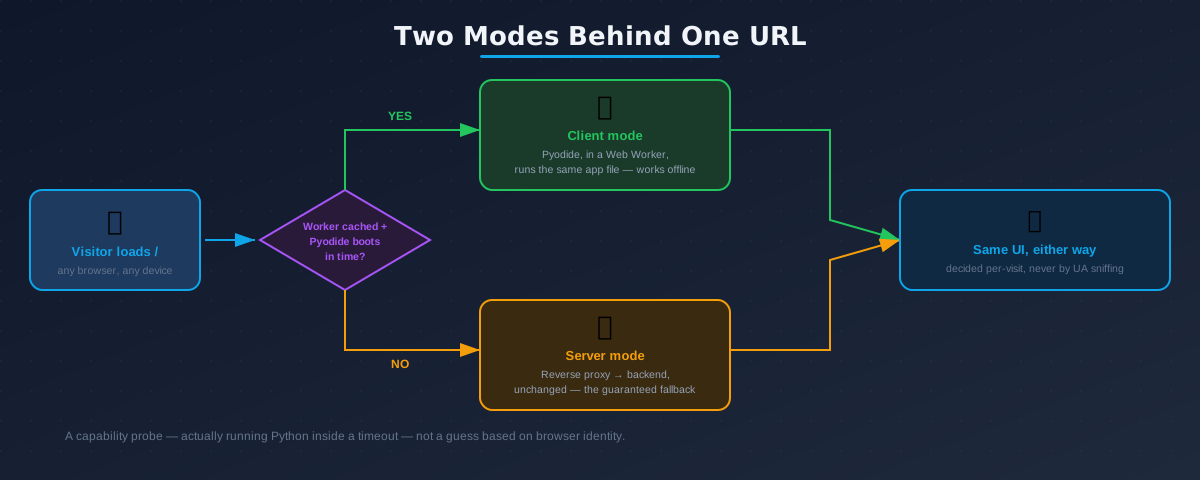
Which mode a visitor gets is decided per-visit, by actually trying to boot the interpreter inside a timeout — not by sniffing which browser they’re on. Browser identity is a weak proxy for capability: “Chrome” on an iPhone is a WebKit wrapper under the hood, not the Chrome engine, because Apple requires WebKit for every browser brand on iOS regardless of the name on the icon. A capability probe answers the question you actually care about; a user-agent string answers a question that stopped being reliable years ago.
The single most dangerous bug shape: the silent 200
This is the one lesson from all three projects that generalizes furthest beyond PWAs and Pyodide entirely, and it’s worth internalizing regardless of what you’re building.
The trap. A reverse proxy’s catch-all route will happily forward any path it doesn’t specifically recognize to whatever backend is sitting behind it — and that backend answers with HTTP 200 and its own HTML, not a 404. So a wrong route doesn’t fail loudly. It succeeds, with the wrong content, and a naive
curl -o /dev/null -w "%{http_code}"health check waves it straight through as healthy.
I hit this exact shape three separate times, in three unrelated parts of a stack: a service worker file (/sw.js) that a misrouted proxy served as the app’s own HTML instead — the browser correctly refuses to register HTML as a service worker, so it just silently never activates, no console error, no crash, nothing; a manifest.json route that could have collided with an unrelated file the backend framework already served at that same path, with neither side aware the other existed; and a tunnel endpoint that pointed straight at the backend, completely bypassing an entire reverse-proxy layer, while the public URL kept returning a perfectly normal-looking 200 OK the whole time.
The fix is a habit, not a tool: verify by content-type and response body, never by status code alone.
$ curl -sI https://example.com/sw.js
HTTP/2 200
content-type: text/html; charset=utf-8   ← should be application/javascript
cache-control: max-age=14400
That single line — text/html where you expected application/javascript — is the entire bug. A status-code-only check would have called this healthy. Whatever your equivalent of make pwa-check is, assert on the header, not just the number.
“Works online” hides dependency problems that only surface offline
micropip, Pyodide’s package installer, resolves a bare-name requirement (say, protobuf>=7.34.1) against a local index of what Pyodide ships natively. If the bundled version doesn’t satisfy the constraint, it quietly reaches out to pypi.org instead. That fallback is invisible the moment you have a network connection — and fatal the moment you don’t.
I’ve hit this three distinct ways across these projects:
- A framework’s real dependency outgrew what Pyodide bundles. Pyodide shipped protobuf 6.31; the framework needed ≥7.34.1. Works fine while online, because micropip just fetches the newer one from PyPI without telling you.
- Some packages are installed imperatively, never declared anywhere in a manifest. A setup script calls
micropip.install("six")directly; nothing in any wheel’s metadata sayssixis needed, so a scan of “what does this app depend on” misses it entirely — and a vendoring script built from wheel metadata alone will miss it too. - A requirement was hardcoded inside someone else’s minified JavaScript bundle. A third-party worker script contained a literal string like
push("protobuf>=7.34.1,<8")— a constraint no dependency-metadata tool would ever discover by inspecting packages.
The general lesson: when you’re vendoring a sandboxed runtime for genuine offline use, “I downloaded the files” is not the invariant that matters. The invariant is the local package index can satisfy every requirement by name — which means walking actual wheel metadata, decoding bundled worker code if you have to, registering everything the sandbox might ask for into its own lock file, and then verifying — with the network actually disconnected — that nothing is left that would reach out.
Not everything that’s cached should be cached the same way
Two different promises get confused under the single word “cache,” and mixing them up either serves stale code forever or throws away a user’s multi-hundred-megabyte download for no reason.
| File type | Example | Correct policy |
|---|---|---|
| Content-addressed — the name encodes the content | index-g7ewbxvi.js, numpy-2.1.0-cp312.whl | cache forever, immutable — the name changes the instant the bytes do |
| Stable-named — same name, contents change over time | pyodide.mjs, app-bundle.js | must revalidate — an immutable tag here can pin a device to a superseded runtime for a year |
The habit worth keeping: split your cache by rate of change, not by convenience. Keep a small “shell” cache — your own app code, refreshed in the background on every visit — separate from a large “vendor” cache — the WASM runtime and its packages, downloaded once and left alone. I bundled both under one cache name early on, and editing a single line of app code silently evicted every user’s entire offline download along with it, because bumping the cache version to pick up the code change nuked the 100+ MB runtime too.
A Workbox-style split looks roughly like this:
// sw.js
const SHELL_CACHE = 'app-shell-v14';   // bump often, small, revalidates
const VENDOR_CACHE = 'wasm-vendor-v1'; // bump rarely, large, immutable

self.addEventListener('fetch', (event) => {
  const url = new URL(event.request.url);
  const cacheName = url.pathname.startsWith('/vendor/') ? VENDOR_CACHE : SHELL_CACHE;
  const strategy = url.pathname.startsWith('/vendor/') ? cacheFirst : staleWhileRevalidate;
  event.respondWith(strategy(event.request, cacheName));
});
Install rules that actually bite
Because the whole point of client-side compute is that it keeps working with no network, installing the app stops being a marketing checkbox and starts changing real behavior:
- Safari on macOS is a dead end for this. “Add to Dock” produces a standalone window, but it doesn’t reliably retain a large WASM cache, so the installed app can’t boot without a network anyway — which defeats the entire point. Tell Safari/macOS users to use Chrome or Edge rather than walking them through an install that quietly doesn’t do what they think.
- iOS makes installing mandatory, not optional. WebKit’s Intelligent Tracking Prevention evicts all script-writable storage — localStorage, IndexedDB, the Cache API, even the service worker registration itself — after about a week of not visiting a page in a plain browser tab. Home-screen web apps are exempt from that eviction. Skip installing on an iPhone and your carefully vendored runtime gets silently thrown away and has to be re-downloaded on the next visit.
- A CDN- or edge-caching layer in front of your app can fight your service worker. Rules that rewrite
<script>tags on the fly can break a Web Worker’s boot sequence outright, and a blanket “cache everything” rule on/sw.jsor/index.htmlcan pin visitors to a stale worker indefinitely. If you’re behind Cloudflare, Fastly, or similar, check those settings specifically for your PWA’s core paths.
When the config lives outside your repo, change the side you control
A recurring shape across these projects: some piece of infrastructure — a tunnel, a load balancer, a DNS-level router — has its own configuration living in a dashboard, not in your repository, and changing it is a manual, out-of-band step someone has to remember and has to have access to make.
The tempting fix is “ask that external thing to point somewhere else.” It works, but it’s a step that can be forgotten, and it makes your local and production environments topologically different forever after — local traffic takes one path, production traffic takes another, and every bug you can’t reproduce locally starts with “well, actually the routing is different.”
The better move, when you have the choice: make your own reverse proxy take over the exact endpoint the external system already points at, instead of asking the external system to change. If a tunnel has always pointed at port 8502, move your proxy onto port 8502 and push the original backend to a loopback-only diagnostic port behind it. Deploying the fix becomes one command with zero dashboard steps, because you changed the side you actually control instead of the side you don’t — and now local and production exercise the identical code path, which is the whole reason bugs like the silent-200 above stop being possible to reintroduce by accident.
How you actually verify any of this
Almost nothing in this post was found by reading code. It was found by running a real browser against a real deployment, going offline inside that browser session, and comparing outputs — three habits worth carrying into any offline-first or in-browser-compute project:
- Prove equivalence by comparison, not by inspection. “The code looks right” is not proof. Run the same input through both paths — server-computed and client-computed — and diff the actual numbers. If they don’t match to the precision you claim, you don’t have offline parity, you have two implementations that happen to usually agree.
- Test every routing claim with a real HTTP request, never by reading a config screen. A token-based tunnel’s routing table often isn’t even in your repository to read. “I checked the dashboard” is not the same as “I sent a request and looked at the response.”
- Documentation describes intent; the running system is the fact. A file list, a dependency manifest, a routing diagram — all of these drift true without anyone re-checking, quietly, until a fresh build or a fresh deploy exposes exactly where. Re-verify against the live system before trusting a document that describes it.
If you keep five things from this
- A service worker can only replay bytes, not run code. Offline compute needs an actual interpreter shipped to the client — that’s what Pyodide/WebAssembly is for, and there’s no way around shipping the interpreter itself.
- A 200 status code is not proof of success. Any proxy with a catch-all can answer a wrong path with the wrong content and a happy status code. Check the content-type and the body, always.
- “Works online” hides dependency problems that only surface offline. A sandboxed package resolver will silently reach the real internet unless you prove its local index can satisfy every name it might be asked for — with the network actually off.
- Not all cached files should be cached the same way. Content-addressed names can be cached forever; stable names must always revalidate — and split your caches by how often things change, not by convenience.
- When a config lives outside your repo, change the side you control. Moving your own proxy onto an external system’s existing endpoint beats asking a remote dashboard to change — fewer manual steps, fewer things anyone has to remember.
Last modified: 29 Oct 2026